Discord has revolutionized the way we communicate online. What started as a gaming-centric voice chat platform has evolved into one of the world's most popular communication apps,
Discord has revolutionized the way we communicate online. What started as a gaming-centric voice chat platform has evolved into one of the world’s most popular communication apps, with over 200 million monthly active users as of 2026. Whether you’re a gamer coordinating with your squad, a community manager running a server with thousands of members, or just someone looking to hang out with friends, Discord offers a seamless experience across all your devices.
For Android users, accessing it is typically as simple as visiting the Google Play Store. But many users seek out the Discord APK for various reasons; perhaps their device doesn’t support Google services, they’re in a region with restricted access, or they want to explore beta features before public release.
This comprehensive guide covers everything you need to know about its APK: official vs. modified versions, how to download safely, key features, potential risks, and answers to frequently asked questions. Whether you’re a first-time user or a seasoned user, this article will help you make informed decisions about installing and using it on your Android device.
Before diving into the technical aspects of Discord APK, it’s worth understanding what makes it such a powerful platform.
It is a free voice, video, and text communication app designed primarily for gaming communities but now used by diverse groups, including:
Gamers: Real-time voice chat during gameplay
Study Groups: Collaborative learning and file sharing
Professional Teams: Remote work communication
Hobby Communities: Everything from book clubs to cryptocurrency enthusiasts
Friends and Family: Private servers for staying connected
Core Features That Make it Stand Out
Feature
Description
Servers
Organized communities with customizable channels
Voice Channels
Jump in and out of conversations without calling
Video Calls
Screen sharing and video chat with up to 50 participants (or more with Nitro)
Text Channels
Organized discussions with markdown formatting, emojis, and file sharing
Direct Messages
Private one on one or group conversations
Roles & Permissions
Granular control over who can access what
Bots & Integrations
Extend functionality with third-party bots
Go Live
Stream your screen or games to friends
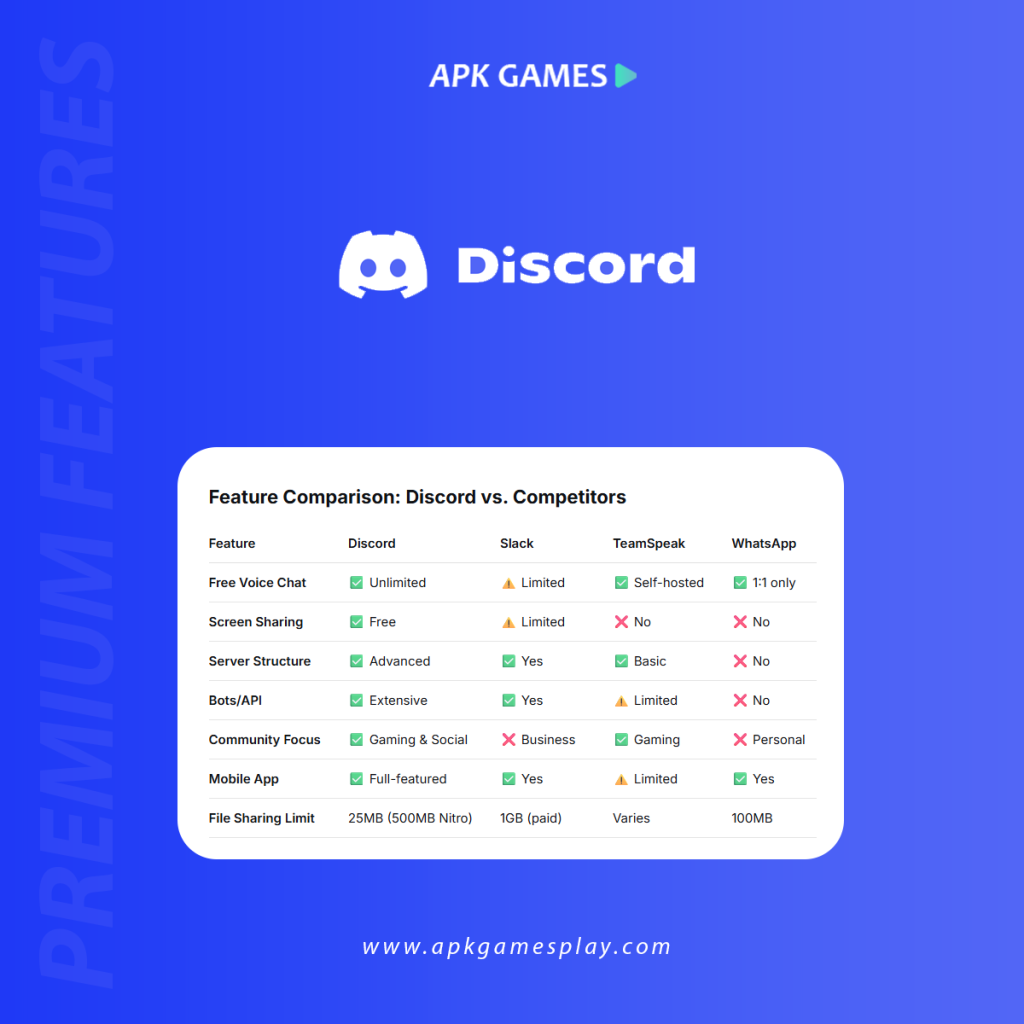
It is available on virtually every platform: Windows, macOS, Linux, Android, iOS, and even web browsers. This cross-platform compatibility is one of its greatest strengths; you can start a conversation on your PC and continue it on your phone without missing a beat.
What Is Discord APK?
APK stands for Android Package Kit; it’s the file format Android uses to distribute and install applications. An APK is simply the installation file for the Discord app.
While most users download it directly from the Google Play Store, APK files serve several purposes:
Sideloading: Installing apps without using the Play Store
Version Control: Installing specific older versions for compatibility
Beta Testing: Accessing beta features before official release
Offline Installation: Installing on devices without Play Store access
Region Bypass: Installing in regions where the Play Store listing is restricted
Official Discord APK vs. Discord MOD APK
This is the most critical distinction any user must understand. There are two completely different types of Discord APKs circulating on the internet, and confusing them can lead to serious consequences.
Claims to offer “free Nitro,” custom themes, removed restrictions
Updates
Manual only; no security patches
Compliance
Violates its Terms of Service
Account Safety
High risk of permanent account ban
Critical Warning: MOD APKs are never safe. They violate Discord’s Terms of Service and frequently contain malware designed to steal your login credentials, personal data, and even take control of your device.
Key Features of Official Discord APK
When you install the official APK on your Android device, you gain access to a comprehensive set of features that make mobile communication seamless:
1. Voice Chat with Noise Suppression
This mobile app includes advanced noise suppression technology that filters out background noise, making your voice clear even in noisy environments. Whether you’re gaming on the go or taking a call from a coffee shop, your friends will hear you clearly.
2. High-Quality Video Calling
The mobile Discord app supports video calls with up to 25 participants (depending on server boosts and Nitro subscriptions). You can switch between front and rear cameras, and even share your screen to show what’s on your device.
3. Screen Sharing
Share your mobile screen with friends in voice channels or direct calls. This is perfect for:
Showing someone how to use an app
Watching videos together
Collaborating on documents
Troubleshooting device issues
4. Push to Talk and Voice Activity
It offers flexible voice input options for Android:
Voice Activity: Automatically transmit when you speak
Push to Talk: Hold a button to transmit (great for noisy environments)
5. Rich Notifications
Customize your notification settings per server and per channel. You can choose to receive:
All messages
Only @mentions
Nothing at all
6. Overlay for Gaming
For Android gamers, Discord offers an in-game overlay that lets you see who’s talking and quickly reply to messages without leaving your game. This feature is available on supported devices running Android 8.0 or higher.
7. Server Organization
Manage your servers directly from mobile:
Create and manage channels
Assign roles
Moderate members
Set up welcome screens
8. Nitro Integration
While Nitro requires a subscription, the official app fully supports all Nitro features, including:
Animated avatars
Custom emojis across servers
Higher quality screen sharing
Larger file uploads (up to 500MB)
9. Accessibility Features
This APK includes:
Screen reader support (TalkBack)
High contrast mode
Large text options
Keyboard navigation
How to Download and Install Official APK Safely
Method 1: Google Play Store (Recommended)
This is the safest and easiest method for most users.
Open Google Play Store on your Android device
Search for “Discord – Talk, Play, Hang Out”
Verify the developer is “Discord Inc.”
Tap Install and wait for the download to complete
Open the app and log in or create an account
Method 2: Discord Official Website
If you cannot access the Google Play Store, you can download the official APK directly from Discord.
Open your mobile browser and go to discord.com
Navigate to the Download section – the site should automatically detect your device
Tap the Android download button
Enable Unknown Sources if prompted:
Go to Settings > Security
Toggle on “Install from Unknown Apps” for your browser
Open the downloaded APK from your notifications or file manager
Tap Install and wait for completion
Open it and log in
Method 3: Trusted APK Mirror Sites (Use with Caution)
If you need a specific older version or your device has compatibility issues, you may use reputable APK mirror sites. Only use sites with a proven track record:
APKMirror.com – Owned by the same company as Android Police; all APKs are verified
APKPure.com – Generally reliable, but verify signatures
Important Safety Checks:
What to Check
Why It Matters
File signature matches Discord Inc.
Ensures the APK hasn’t been tampered with
Download count and user reviews
High downloads and positive reviews indicate legitimacy
File size (around 130-150 MB)
Drastic size differences may indicate malware
No “MOD” or “Cracked” in filename
Legitimate APKs never contain these terms
Possible risks of MOD APK:
MOD APKs for Discord promise enticing features that the official app doesn’t offer. Common claims include:
Free Nitro with all premium features
No ads (though Discord doesn’t have ads in the first place)
Custom themes beyond the official options
Unlimited file uploads
Removed restrictions on servers and channels
None of these claims is worth the risk. Here’s why:
1. Account Ban
Using a modified Discord client is a direct violation of Discord’s Terms of Service. Section 5 of the Terms of Service explicitly prohibits modifying the client or using unofficial versions.
Consequences:
Permanent account suspension
Loss of all servers, messages, and friends
Inability to create new accounts with the same email or phone number
2. Malware and Spyware
Security researchers consistently find that MOD APKs are among the most common vectors for malware distribution. Discord MOD APKs have been found to contain:
Malware Type
What It Does
Keyloggers
Records everything you type, including passwords
Credential Stealers
Harvests your Discord login token
Backdoors
Allows attackers remote access to your device
Adware
Floods your device with intrusive ads
Spyware
Monitors your activity and steals personal data
3. Data Theft
When you log into a modified Discord client, you’re handing your login credentials to an unknown third party. Attackers can:
Take over your account on this app.
Access your direct messages.
Impersonate you to scam your friends.
Use your account to spread malware.
Steal personal information shared in private conversations.
4. No Security Updates
The official Discord app receives regular security updates to patch vulnerabilities. MOD APKs never receive these updates, leaving your device exposed to known exploits.
5. Unstable Performance
Modified clients are notoriously unstable. Users report:
Frequent crashes
Missing notifications
Failed voice calls
Corrupted message history
Battery drain issues
Real World Examples
In a Microsoft Q&A support thread, a user reported that after visiting a “discord apk mod” website, their computer began displaying unusual pop-ups and showed a suspicious “football” icon with a countdown timer. Microsoft experts confirmed this was a malware infection requiring full system cleanup.
Cybersecurity firms regularly report finding Discord-themed malware in the wild, with attackers using the promise of “free Nitro” to trick users into downloading malicious APK files.
How to Protect Your Discord Account
Whether you’re using it on Android or any other platform, follow these security best practices:
1. Enable Two-Factor Authentication (2FA)
This is the single most important security measure you can take.
How to enable:
Go to User Settings > Account
Click “Enable Two-Factor Auth”
Scan the QR code with Google Authenticator or Authy
Save your backup codes in a safe place
2. Use Strong, Unique Passwords
Never reuse passwords across different services. Use a password manager to generate and store complex passwords.
3. Never Share Your Token
Your Discord token is essentially a master key to your account. Never paste it anywhere or share it with anyone. Official Discord apps never ask for your token.
4. Be Wary of “Free Nitro” Links
Scammers frequently use the promise of free Nitro to trick users into clicking on malicious links or sharing account information. Discord will never ask for your password or token to grant Nitro.
5. Review Authorized Apps Regularly
Periodically check which third-party apps have access to your account:
User Settings > Authorized Apps
Revoke access for any apps you don’t recognize or no longer use
6. Keep the Official App Updated
Always run the latest version of the official Discord app to benefit from security patches and bug fixes.
Frequently Asked Questions about this APK
Is Discord APK safe to download?
Yes, if you download it from official sources (Google Play Store or discord.com). Never download Discord APK from third-party websites claiming to offer “MOD” or “cracked” versions.
Can I get banned for using Discord MOD APK?
Yes. Using any modified version of it is a violation of Discord’s Terms of Service and can result in permanent account suspension. Discord has automated systems that detect unofficial clients.
What’s the difference between Discord APK and Discord MOD APK?
Official APK
MOD APK
Published by Discord Inc.
Published by unknown third parties
Verified and secure
Often contains malware
Complies with Terms of Service
Violates Terms of Service
Auto-updates via Play Store
Must manually update
No account risk
High risk of account ban
Does Discord have ads?
No. Unlike many other social platforms, it does not display advertisements in its core user experience. Any “ad-free” claim in MOD APKs is misleading; official Discord already has no ads.
How can I get Discord Nitro for free?
It occasionally offers free Nitro promotions through legitimate partnerships (like Xbox Game Pass or Epic Games Store). You can also earn Nitro through server boosts in some communities. However, any website or APK promising “free Nitro forever” is a scam.
Can I use this app on Android without Google Play?
Yes. You can download the official APK directly from discord.com. This method does not require Google Play Services and works on devices without Google support.
What Android version do I need for Discord?
It requires Android 7.0 (Nougat) or higher. The app is optimized for both phones and tablets.
Why does it need so many permissions?
This APK requests permissions that enable core functionality:
Microphone: For voice chat
Camera: For video calls
Storage: For sending and saving files/images
Notifications: For message alerts
Location: Optional, for “Nearby” features
All permissions are standard for communication apps and can be managed in your device settings.
Conclusion: Choose Official, Stay Safe
It has become an essential communication tool for millions of people worldwide. Its official Android app delivers a rich, feature-complete experience that meets the needs of gamers, communities, and everyday users alike.
While the promise of “free Nitro” or enhanced features in MOD APKs may seem tempting, the risks far outweigh any potential benefits:
Account loss: Permanent bans are irreversible
Security threats: Malware can compromise your entire device
Privacy violations: Your personal data can be stolen
No support: Discord won’t help if a MOD causes problems
Key Takeaways
✅ Download only from official sources: Google Play Store or discord.com ✅ Enable two-factor authentication to protect your account ✅ Keep the app updated for security patches and new features ✅ Be skeptical of “free” offers—if it sounds too good to be true, it is ❌ Never install Discord MOD APKs from third-party websites ❌ Don’t share your account token or password with anyone
It is free, secure, and constantly improving. By using the official app, you’re not only protecting yourself but also supporting the developers who keep the platform running. Stay tuned to APK Games Play for more articles like this.
Disclaimer: This article is for informational purposes only. We do not host, distribute, or encourage the use of modified APK files. Users are solely responsible for their own download and installation choices. Always prioritize your digital security by using official software from verified sources.
Samina Tariq is a Computer Science graduate from the National University of Emerging Sciences ( FAST ), Islamabad. I am a lead technical content writer at APK Games Play, and I review articles of fellow writers. Being a Quality Assurance engineer at Systems Limited, Islamabad. I have profound experience in testing and reviewing all the apps and writing guidelines for APK Games and APPS.